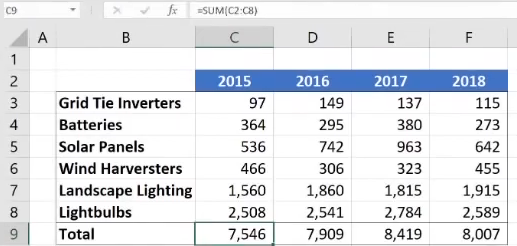
The AutoSum formulas in the range C9:F9 below return unexpected values. Why is this?
The AutoSum formulas include the year at the top of each column in the calculation. The formula bar clearly shows it's the dates (top row) included, along with the total (bottom) row. Thus, the bottom row of data is not excluded.
The formula bar clearly shows it's the dates (top row) included, along with the total (bottom) row. Thus, the bottom row of data is not excluded.
The AutoSum formulas refer to the column to the left of their cells.
The AutoSum formulas include their own cells, creating a circular reference.
The AutoSum formulas exclude the bottom row of data.